Uploading clips to the site is pretty straightforward. In order to save server load and make it easier to stream, we have a limit of 100 MB per file. We can easy solve this by using a handy tool called HandBreak. Download it here.
Once installed, open HandBreak and follow the steps below.
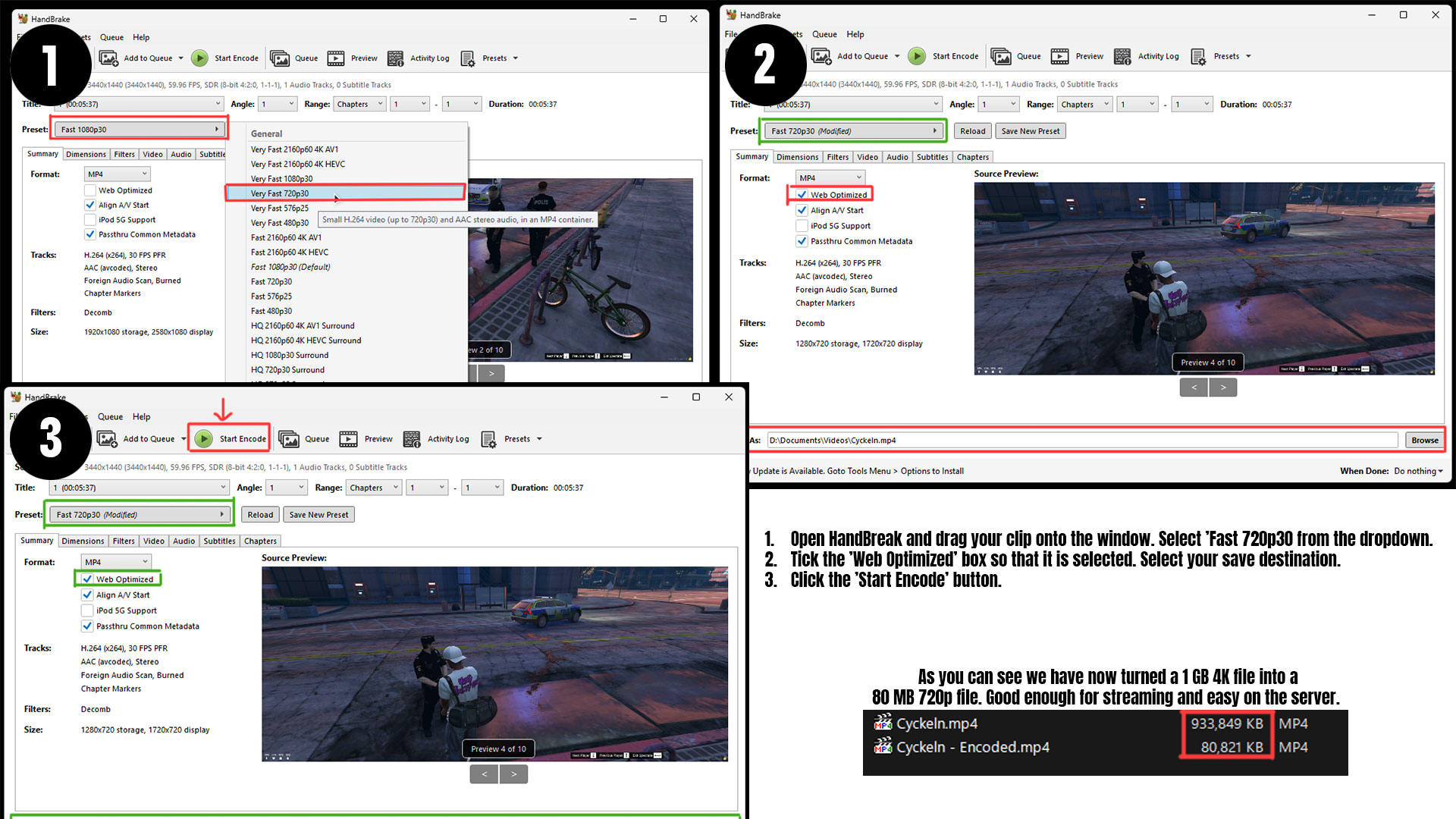
- Drag your clip onto the window. Select ‘Fast 720p30’ from the Preset dropdown. 720p and 30 fps is good enough for proofing.
- Tick the ‘Web Optimized’ box so that it is selected and choose your save location at the bottom.
- Click the big ‘Star Encoding’ button at the top and let it work.
In the image reference below, you can see that we turned a 1 GB 4k video file into an 80 MB 720p file. This video in particular was 5 minutes long, so quite a drastic change.
Once encoded, go ahead and upload the file to the website and share with server mods using the links below the video.
Embed codes